Mobile revival of Season 6 MU with fast progression and cross-play
Recreates classic Season 6 mechanics with real-time combat, large events, and offline farming, playable across Android and Windows. MU VEXOR develops the title for players seeking high-progression, social PvP and mid-rate progression. Key systems include multiple iconic classes, wings and mounts, dual UI modes, and an automator called MU Helper. The game fits returning MU Online veterans and mobile RPG players who want quick advancement and persistent cross-platform characters.
What kind of game is VexorMU?
VexorMU is a fantasy MMORPG that follows the Season 6 formula: character growth through gear, level grinding to around level 400, and repeated event runs such as Blood Castle and Devil Square. The core loop is kill, loot, upgrade: equipment upgrades, wings and legendary sets drive power gain, while a player-driven marketplace moves jewels and gear between accounts.
Does it have multiplayer modes and community systems?
The game supports real-time PvP duels, guild wars, and large-scale raids against world bosses, plus classic event instances for coordinated groups. Cross-platform synchronization lets the same account play on Android and PC, and community interaction appears through an in-game marketplace and external Discord and Facebook groups maintained by the developer, which the game uses for server updates.
What does the game look and sound like?
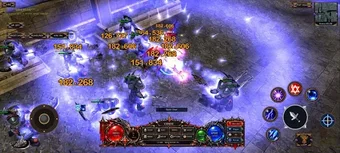
The presentation channels Season 6 visuals into mobile with a choice of Modern or Classic UI modes, preserving the original sprites and effects while offering adjusted layouts. Audio keeps the high-fantasy ambience familiar to MU players; adaptive FPS settings up to 240 FPS aim to keep animations smooth on higher-performance setups and the reconnection system reduces disruption during unstable connections.
Is it hard to get started and how does progression behave?
Onboarding leans on nostalgia rather than guided tutorials: maximum level caps around 400 and stat caps between 40,000 and 50,000, depending on server configuration. The MU Helper system assigns skills, uses auto-potions, and allows offline experience via an Offline Train, which accelerates progression for players who prefer passive advancement alongside active play.
In summary, VexorMU suits veterans who want fast, social MU action
For players wanting a Season 6 experience on mobile with persistent cross-play and active community support, VexorMU delivers a familiar progression loop and event roster. Newcomers who prefer heavy tutorial guidance may find the onboarding light, but the MU Helper’s offline gains lower the time investment barrier. The game rewards those seeking character progression through repeated event play and equipment upgrades.